Scenarios
An automation scenario is a platform entity used to configure the operating logic of one or more devices. A scenario
defines the algorithm for monitoring and controlling the object: it tracks changes occurring on the device and automatically
performs predefined actions based on those changes, without requiring user intervention.
An automation scenario is implemented as a finite-state machine
and consists of states and transitions between them:
-
A state represents a period during which no changes occur in the process properties. For example, a scenario may include states such as: device powered on, idle, in motion, or sensor deviation detected. For a vehicle, states could include breakdown, theft, entering a specific geofence, and so on.
-
Transitions occur between states and represent changes in the process properties. Transitions are triggered by events generated within the device management system. Additional conditions can also be defined for a transition. When an event occurs and the specified conditions are met, the system moves from one state to another. For example, a condition may specify that a transition should occur when a sensor reading exceeds a defined threshold. If the sensor value is detected to be above that threshold, the transition is executed. Every transition must connect one state to another.
💡
The principle behind designing a scenario is quite simple and can be
compared to the way people think. For example, the event “I woke up” occurs,
so we transition to the state “Awake.” Then the event “I have a headache”
occurs, and we transition to the state “Headache.” In this state, an action
must be performed: “Measure body temperature.” From there, several transition
paths are possible. Depending on whether the temperature is normal or above
normal, the system transitions to the corresponding state. In the state
“Temperature above normal,” the action “Take a pill” should be performed, and
so on.
A scenario, based on states and transitions between them, defines the logic for the automatic control of the object.
Running scenario eliminates the need for constant monitoring and checking of the current state of the object, since all
actions are executed automatically when the specified events occur.
Scenario cards
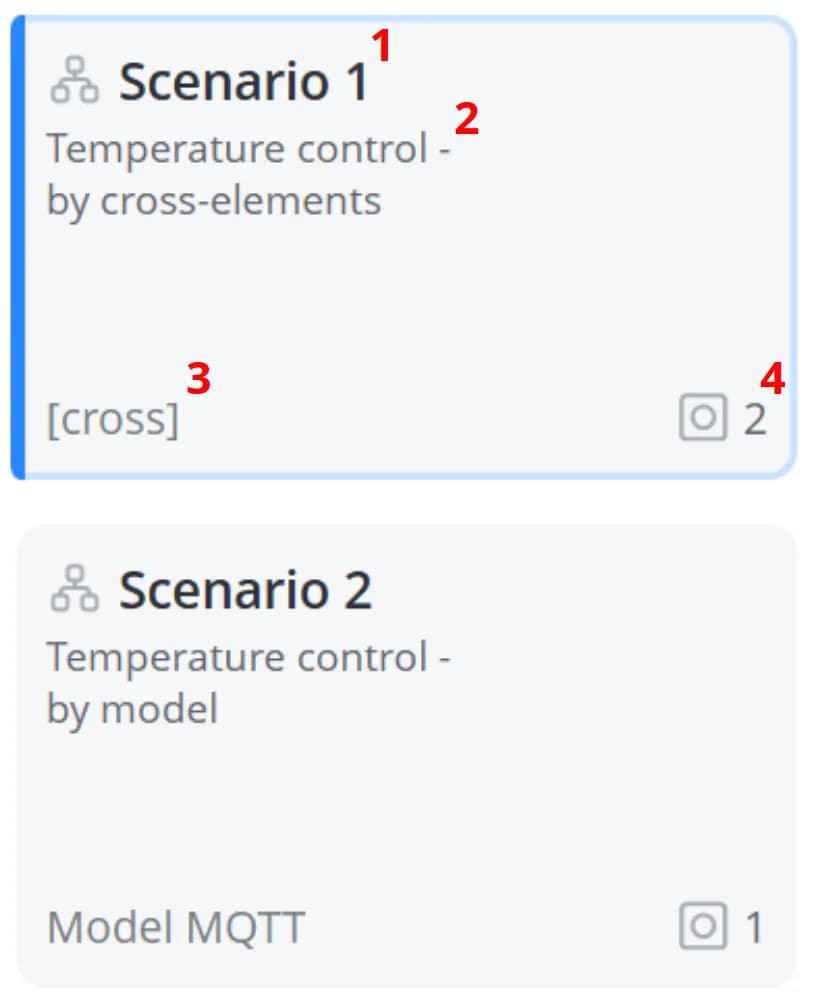
1 – Scenario name
2 – Scenario description
3 – Scenario type. If the scenario was created using cross-elements,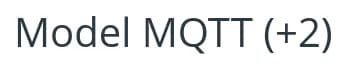
4 – Number of objects included in the scenario. Click it to apply a filter to the object list and display only the objects that are assigned to this scenario.
2 – Scenario description
3 – Scenario type. If the scenario was created using cross-elements,
[cross] is displayed. If the scenario was created
using model parameters, the name of the model is displayed. If multiple models are used, the number of additional models
is displayed in parentheses next to it 4 – Number of objects included in the scenario. Click it to apply a filter to the object list and display only the objects that are assigned to this scenario.