Reports
A report is a collection of data tables generated for selected objects. Reports are particularly useful for objects
with changing locations, which is why they are most commonly used in transportation telematics and personnel tracking
projects.
Reports allow you to aggregate and analyze data from monitored objects, making it easier to perform tasks such as:
- tracking vehicle movement (trips and stops);
- monitoring visits to specific areas on a map (geofences) or checkpoints along a planned route;
- collecting statistics on speed, mileage, battery level, and other sensor readings;
- analyzing fuel consumption data and detecting potential fuel theft or unauthorized fuel drainage.
Report cards
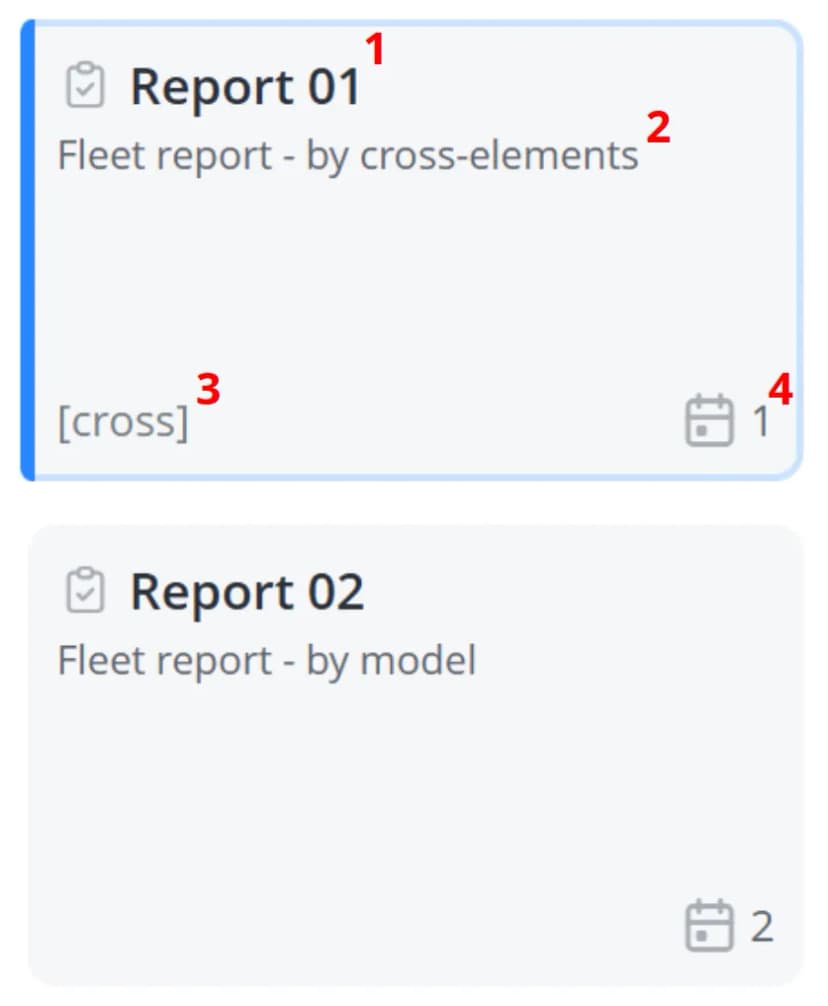
1 – Report name
2 – Report description
3 – Report type. Reports created using cross-elements are marked with
4 – Number of scheduled email deliveries configured for this report. Click the number to open the Sending reports tab and view the complete list of configured deliveries
2 – Report description
3 – Report type. Reports created using cross-elements are marked with
[cross]. Reports created using model parameters
have no additional label displayed4 – Number of scheduled email deliveries configured for this report. Click the number to open the Sending reports tab and view the complete list of configured deliveries